Building a Multi-Node Proxmox Homelab
Building a multi-node Proxmox VE environment for virtualization, Linux containers, storage integration, backups, and self-hosted infrastructure.
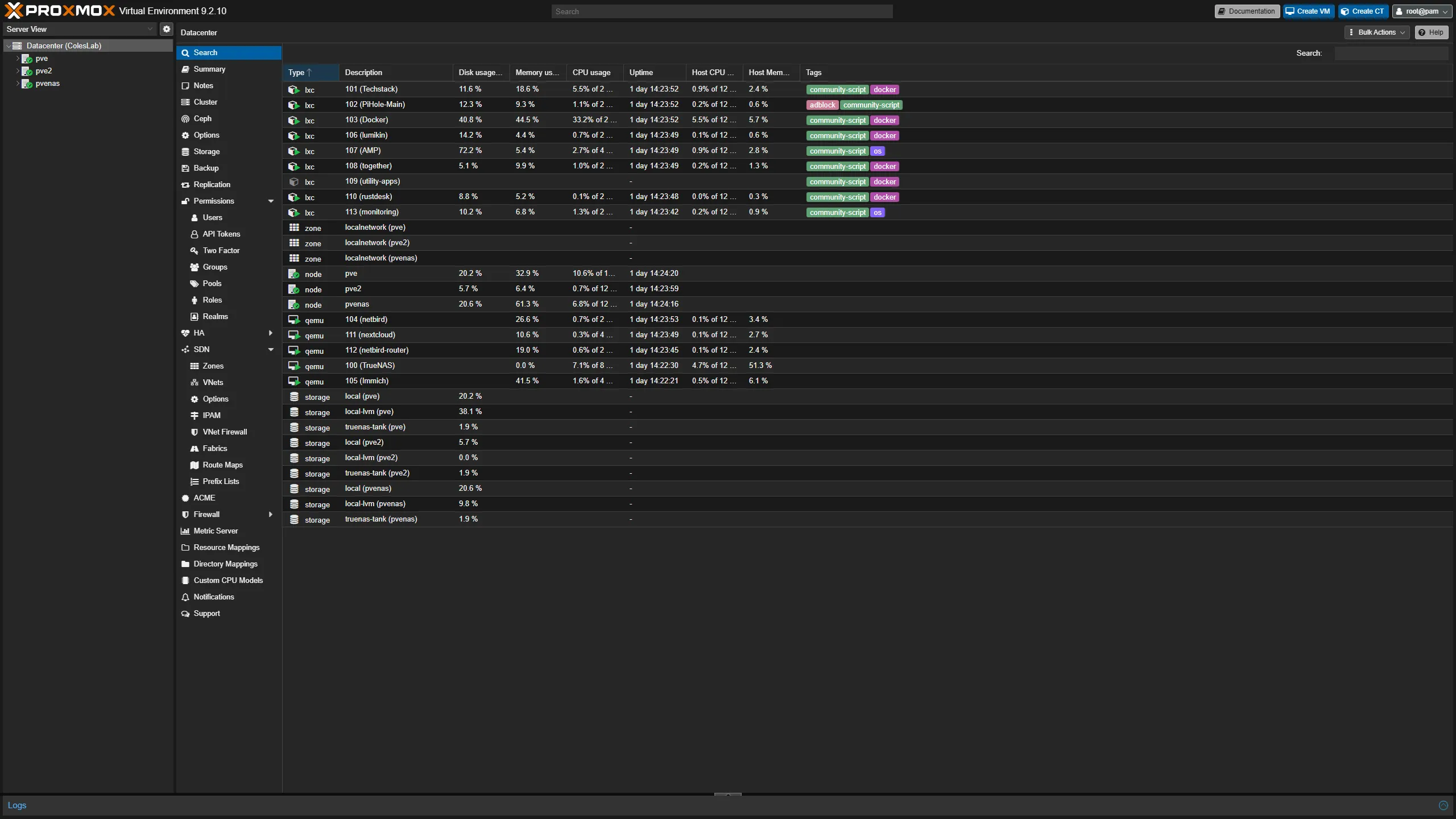
Overview
Proxmox VE became the foundation of my homelab as I moved from running individual applications on dedicated systems toward managing infrastructure as a collection of virtualized services.
Rather than treating each physical computer as an independent server, I built a multi-node Proxmox environment capable of hosting virtual machines, Linux containers, storage services, monitoring systems, and self-hosted applications.
The project gave me practical experience with virtualization, clustering, shared infrastructure, storage dependencies, backups, networking, and troubleshooting systems that depend on one another.
Goals
The environment was designed around several goals:
- Consolidate multiple services onto virtualization hosts
- Learn virtual-machine and Linux-container administration
- Separate applications into logical workloads
- Integrate centralized network storage
- Build repeatable backup and recovery workflows
- Manage infrastructure from a centralized platform
- Allow the environment to expand with additional physical nodes
- Gain experience troubleshooting interconnected systems
Architecture
The environment consists of multiple Proxmox VE systems with different infrastructure responsibilities.
A simplified view looks like:
                    Proxmox Environment
                           |
          +----------------+----------------+
          |                                 |
          v                                 v
     Compute Nodes                     Storage Node
          |                                 |
    +-----+------+                          |
    |            |                          v
    v            v                       TrueNAS
   VMs          LXCs                         |
    |            |                          v
    +------+-----+                         ZFS
           |                                |
           +---------------+----------------+
                           |
                           v
                    Homelab Services
Over time, additional nodes have been added, removed, rebuilt, and returned to the environment as the lab has evolved.
That has made the cluster itself a useful learning environment rather than a configuration that was built once and left untouched.
Virtual Machines and Linux Containers
I use both virtual machines and Linux containers depending on the requirements of a service.
Virtual Machines
Virtual machines are useful when a workload benefits from stronger operating-system isolation or requires its own complete environment.
Examples include infrastructure platforms and applications where I want the guest operating system to behave independently from the Proxmox host.
Linux Containers
LXC containers provide a lighter-weight option for many Linux services.
They require fewer resources than a full virtual machine and are well suited for services such as:
- reverse proxies
- monitoring platforms
- utility applications
- small web services
- infrastructure tools
Choosing between a VM and an LXC has become part of the planning process rather than simply defaulting to one virtualization method.
Infrastructure Roles
One of the biggest changes as the lab developed was moving away from thinking about physical computers as individual machines.
Instead, I began thinking about infrastructure roles.
For example:
Compute
  |
  +-- Proxmox VE
  +-- Virtual machines
  +-- Linux containers

Storage
  |
  +-- TrueNAS
  +-- ZFS
  +-- NFS

Backup
  |
  +-- Proxmox Backup Server

Networking
  |
  +-- OPNsense
  +-- VLANs
  +-- DNS
  +-- VPN

Monitoring
  |
  +-- Prometheus
  +-- Grafana
  +-- Uptime monitoring
This makes the environment easier to reason about because each platform has a specific responsibility.
Network Integration
The Proxmox environment is connected to the segmented homelab network rather than operating on an isolated flat LAN.
This means virtualization depends on the underlying network design for:
- management access
- DNS
- storage connectivity
- application access
- monitoring
- backup traffic
- remote administration
This has made Proxmox troubleshooting closely tied to networking.
A VM that appears offline may actually have a problem involving:
- the guest operating system
- its virtual network interface
- the Proxmox bridge
- VLAN configuration
- the physical switch
- OPNsense routing
- firewall policy
- DNS
Understanding those layers has been one of the most useful parts of operating the environment.
Storage Integration
The virtualization environment is integrated with centralized storage provided by TrueNAS.
Network storage allows Proxmox workloads to use shared capacity without requiring every physical node to contain large amounts of local storage.
This also introduced important dependencies.
For example, if an NFS-backed resource becomes unavailable, the visible problem may initially appear inside Proxmox even though the actual failure exists deeper in the storage or network stack.
The dependency chain can look like:
VM / Container
      |
      v
Proxmox
      |
      v
NFS Mount
      |
      v
Network
      |
      v
TrueNAS
      |
      v
ZFS Pool
This reinforced the importance of troubleshooting infrastructure from the dependency layer upward.
Backups
Virtualization made backup management more structured.
Instead of treating each application as an entirely separate backup problem, Proxmox workloads can be protected using centralized backup infrastructure.
I use Proxmox Backup Server as part of the environment to provide VM and container backup workflows.
This allows me to work with concepts such as:
- scheduled backups
- retention
- datastore management
- restore workflows
- backup verification
- recovery planning
One of the most important lessons from building the lab has been that a backup system is only valuable if recovery is understood as part of the design.
Cluster Management
Operating multiple Proxmox nodes introduced cluster concepts that do not appear in a single-host deployment.
These include:
- node membership
- quorum
- cluster communication
- workload placement
- configuration synchronization
- node removal
- node re-addition
- recovery after failed or unavailable members
The environment has gone through changes where nodes were temporarily removed and later returned to service.
Working through those situations provided more useful experience than simply creating a cluster and never modifying it.
Troubleshooting Node Changes
Cluster membership can create dependencies that are easy to overlook.
For example, removing or losing a node affects more than whether that specific computer is online.
It can affect:
- quorum
- cluster commands
- configuration state
- monitoring
- storage references
- service documentation
When making changes, I learned to check the wider environment rather than treating node removal as an isolated event.
Monitoring
The Proxmox nodes are also part of the homelab monitoring environment.
Metrics are collected so I can visualize host health and resource utilization from a centralized Grafana dashboard.
Areas I monitor or plan to expand include:
- CPU usage
- memory utilization
- filesystem capacity
- network throughput
- node availability
- load
- storage health
- service availability
Monitoring multiple nodes from one platform is significantly more useful than logging into each system independently to check its current state.
Why Proxmox
Proxmox has been particularly useful as a learning platform because it combines several infrastructure concepts in one environment.
Working with it has required me to understand more than virtualization alone.
The platform touches:
- Linux administration
- networking
- storage
- clustering
- backups
- permissions
- services
- monitoring
- hardware
That makes it a strong foundation for experimenting with infrastructure while still requiring me to understand the systems underneath the web interface.
Problems and Rebuilds
The environment has not remained static.
Nodes have been rebuilt, storage configurations have changed, services have moved between systems, and cluster membership has evolved.
Although those changes occasionally create more work, they are also where much of the learning happens.
A system that never changes provides fewer opportunities to understand recovery.
Rebuilding a node forces questions such as:
- What configuration actually matters?
- What services depended on this host?
- Where are the backups?
- Which network settings must be recreated?
- What monitoring needs to be updated?
- What cluster state needs to be cleaned up?
- What documentation is now outdated?
Those questions are useful beyond Proxmox itself.
What I Learned
Building and maintaining the Proxmox environment taught me several important infrastructure concepts:
- Virtualization is only one layer of a larger system
- Containers and VMs each have appropriate use cases
- Storage and networking failures can appear as virtualization failures
- Cluster membership introduces operational dependencies
- Backups need tested recovery workflows
- Monitoring becomes more important as the number of systems increases
- Documentation matters when infrastructure changes
- Rebuilding systems exposes assumptions that normal operation can hide
Most importantly, the project shifted my thinking from administering individual computers to understanding how multiple systems combine to provide infrastructure.
Current Status
Proxmox remains the primary virtualization platform in my homelab.
The environment has continued to evolve beyond its original multi-node deployment, including additional compute capacity, centralized storage, monitoring, backup infrastructure, and nodes that have been rebuilt or returned to the cluster.
Rather than considering the platform a finished one-time project, I treat it as the foundation on which the rest of the homelab continues to develop.
Technologies Used
- Proxmox VE
- Debian Linux
- KVM/QEMU
- LXC
- Proxmox clustering
- Proxmox Backup Server
- TrueNAS
- ZFS
- NFS
- VLAN networking
- Prometheus
- Grafana