Building a TrueNAS and ZFS Storage Platform
Building centralized homelab storage with TrueNAS, ZFS RAIDZ1, NFS, Proxmox integration, and backup workflows.
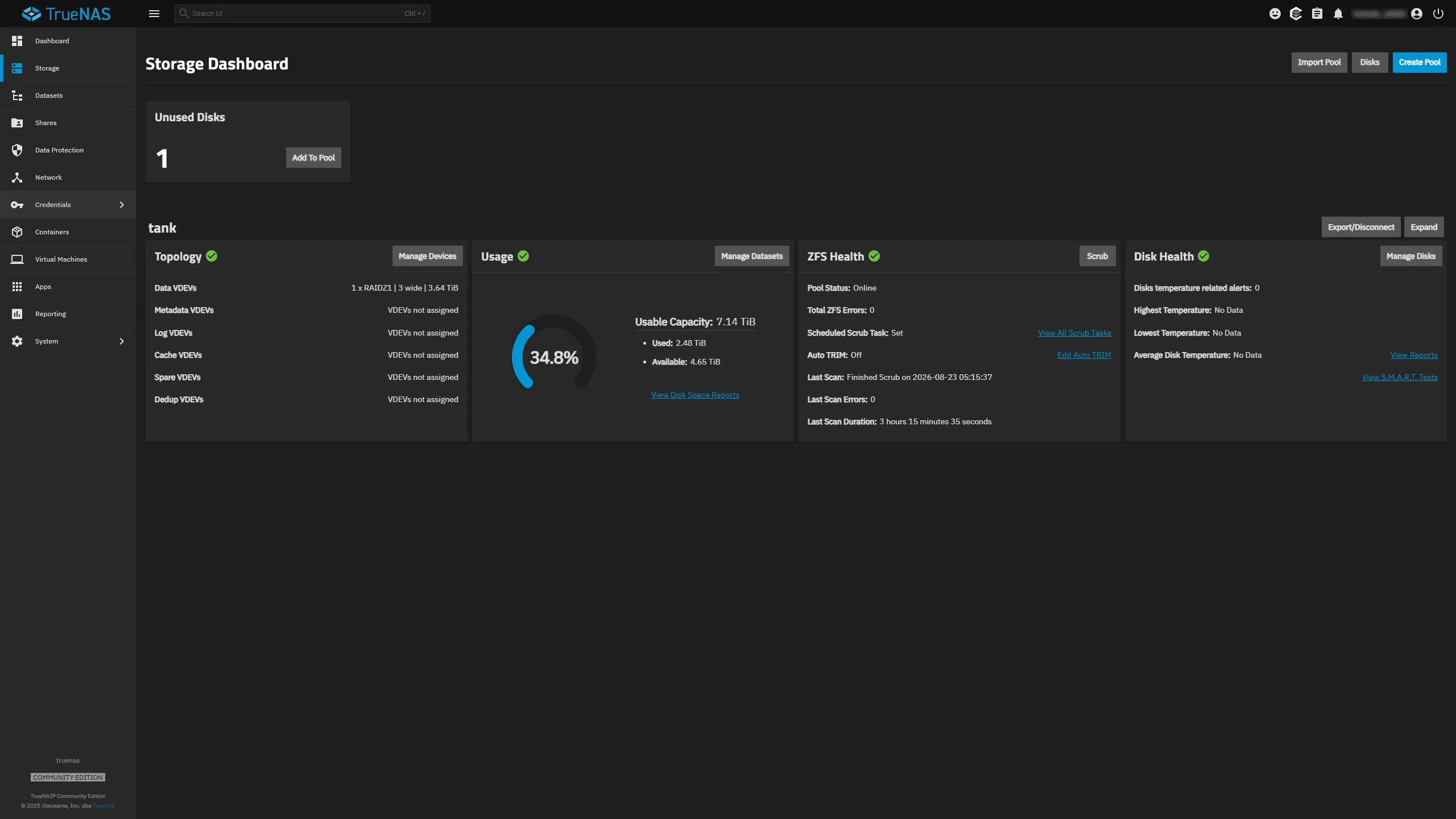
Overview
As my homelab grew, storage became something I wanted to treat as infrastructure rather than simply attaching disks wherever space was needed.
Virtual machines, containers, application data, media, backups, and other services all have different storage requirements. I wanted a centralized platform that could provide shared storage while also giving me hands-on experience with ZFS, network storage, redundancy, and backup design.
I built the storage environment around TrueNAS and ZFS, with the storage platform integrated into my Proxmox environment through NFS.
Goals
The project had several goals:
- Centralize storage for homelab services
- Learn ZFS concepts in a practical environment
- Provide network-accessible storage to virtualization hosts
- Add disk redundancy for important datasets
- Separate application compute from bulk storage
- Support backup workflows
- Make storage health and capacity easier to monitor
- Build something that could be expanded as the lab grew
Storage Architecture
The primary storage pool uses three hard drives configured as a ZFS RAIDZ1 vdev.
In simplified form:
                 Storage Host
                      |
                      v
                   TrueNAS
                      |
                      v
              ZFS RAIDZ1 Pool
              /      |      \
           Disk 1  Disk 2  Disk 3
                      |
                      v
                    NFS
                      |
             +--------+--------+
             |                 |
             v                 v
        Proxmox Hosts     Homelab Services
RAIDZ1 provides single-disk fault tolerance while still allowing the majority of the raw capacity to remain usable.
For my environment, that provided a practical balance between capacity, redundancy, cost, and the number of disks available.
Why ZFS
One of the main reasons I wanted to use TrueNAS was the opportunity to work directly with ZFS.
ZFS combines several storage concepts that would otherwise be handled by separate layers, including:
- pooled storage
- software RAID
- checksumming
- snapshots
- datasets
- capacity management
- integrity checking
The most interesting part for me was that ZFS treats data integrity as a core part of the storage architecture rather than simply assuming that a successful disk read means the data is correct.
RAID Is Not Backup
One of the most important concepts reinforced by this project is that redundancy and backup solve different problems.
RAIDZ1 can allow the pool to continue operating after a disk failure, but it does not protect against every cause of data loss.
For example, RAID does not inherently protect against:
- accidental deletion
- application corruption
- administrator mistakes
- ransomware
- multiple simultaneous failures
- loss of the entire storage system
That means the storage architecture still needs separate backup workflows.
This distinction influenced how I designed the rest of the homelab.
TrueNAS Virtualization
TrueNAS runs as part of the larger virtualization environment rather than as an entirely separate standalone appliance.
This allows me to use the hardware efficiently while still keeping the storage operating system logically separated from other workloads.
It also introduced an important design consideration:
Storage infrastructure should not depend on the storage it is responsible for providing.
I have to consider boot storage, virtualization dependencies, startup order, and recovery paths rather than assuming every service can simply depend on the NAS.
Datasets
Rather than treating the entire storage pool as one large filesystem, ZFS datasets provide a way to logically divide data based on its purpose.
Different datasets can be used for things such as:
- application data
- media
- backups
- shared storage
- archival data
This makes the storage structure easier to manage and gives me more flexibility for permissions, snapshots, and future policy changes.
NFS Integration
The storage platform provides shared storage to the virtualization environment using NFS.
A simplified request path looks like:
Proxmox Host
     |
     v
     NFS
     |
     v
TrueNAS Dataset
     |
     v
   ZFS Pool
Using network storage allows multiple systems to consume storage from a centralized platform instead of requiring large amounts of local disk capacity on every node.
It also gave me practical experience troubleshooting storage problems across several layers:
- physical storage
- ZFS
- TrueNAS
- NFS
- network connectivity
- Proxmox storage configuration
- the consuming VM or container
Proxmox Integration
The storage platform is integrated into my Proxmox environment so virtualization hosts can consume shared storage.
That allows the compute and storage layers to remain somewhat independent.
The Proxmox nodes are responsible for running workloads, while TrueNAS provides centralized capacity for services that benefit from shared or bulk storage.
This architecture also makes it easier to think about the lab in terms of infrastructure roles rather than individual computers.
Compute
  |
  +---- Proxmox
  |
  +---- Virtual Machines
  |
  +---- Linux Containers


Storage
  |
  +---- TrueNAS
  |
  +---- ZFS
  |
  +---- NFS


Backup
  |
  +---- Proxmox Backup Server
Backup Infrastructure
The environment also includes Proxmox Backup Server for VM and container backup workflows.
This is separate from the TrueNAS storage role.
I wanted backup to be treated as its own infrastructure function rather than assuming that storing data on redundant disks was enough.
The combination gives me practical exposure to several distinct concepts:
- primary storage
- shared storage
- disk redundancy
- snapshots
- virtual-machine backups
- restore workflows
Monitoring Storage Health
Storage is one of the areas where failures can remain unnoticed until they become serious, so visibility matters.
I monitor the storage platform alongside the rest of the homelab to keep track of availability and health.
Useful areas to monitor include:
- pool state
- capacity utilization
- disk health
- service availability
- backup status
- storage connectivity
As my Prometheus and Grafana environment develops, storage metrics are another area I plan to integrate more deeply into centralized monitoring.
Problems Storage Systems Introduce
Centralized storage solves several problems, but it also creates dependencies.
If the storage platform becomes unavailable, every service that depends on it can be affected.
That means troubleshooting a storage-dependent application may require looking beyond the application itself.
A failure path could look like:
Application unavailable
        |
        v
VM or container
        |
        v
Proxmox storage mount
        |
        v
Network connectivity
        |
        v
NFS service
        |
        v
TrueNAS
        |
        v
ZFS pool
        |
        v
Physical disks
This has helped reinforce the importance of troubleshooting from the underlying dependency upward rather than immediately assuming the visible application is the source of the problem.
What I Learned
This project gave me a much better understanding of how storage fits into the rest of an infrastructure environment.
Some of the most important lessons were:
- RAID and backup are not interchangeable
- Storage architecture introduces dependencies that need to be understood
- Shared storage connects networking and systems administration very closely
- ZFS datasets provide useful logical organization within a storage pool
- Capacity planning matters before the filesystem is nearly full
- Storage health should be monitored proactively
- Recovery planning is just as important as deployment
- A successful backup workflow is incomplete until restores are considered
Current Status
The TrueNAS and ZFS platform is currently part of the core storage infrastructure for my homelab.
It provides centralized storage to other systems while also serving as a practical environment for learning ZFS administration, network storage, monitoring, redundancy, and backup design.
Like the rest of the lab, the storage architecture continues to evolve as I add services and learn better ways to structure the environment.
Technologies Used
- TrueNAS
- ZFS
- RAIDZ1
- NFS
- Proxmox VE
- Proxmox Backup Server
- Linux
- Network storage
- Storage monitoring